A processing register is complete on the day it is delivered and out of date three months later. The DPIA lives in a Word document that circulates by email, the data breach arrives on Friday afternoon, and the processor agreement with the new supplier sits with procurement. Privorium, Audirium's privacy app, puts those registers in one file in which they reference each other, so the data protection officer supervises something that is actually kept up to date.
Updated 12 November 2026
In brief
What Privorium is, in three tiles.
Privorium is Audirium's privacy management app for data protection officers, privacy officers and the CISO who handles the GDPR portfolio on the side. The app is in use at organisations with real data.
The six registers sit in one file per organisation and reference each other. The processing activity is the hub.
On top of that, the Compliance Meter measures whether the rules are followed on the work floor, and where knowledge and behaviour diverge.
What lands on the DPO's desk
Four places, four ways it gets stuck.
The GDPR asks for a demonstrably working process; the documents are at most the trace of it. In practice, that process lands in four places at once.
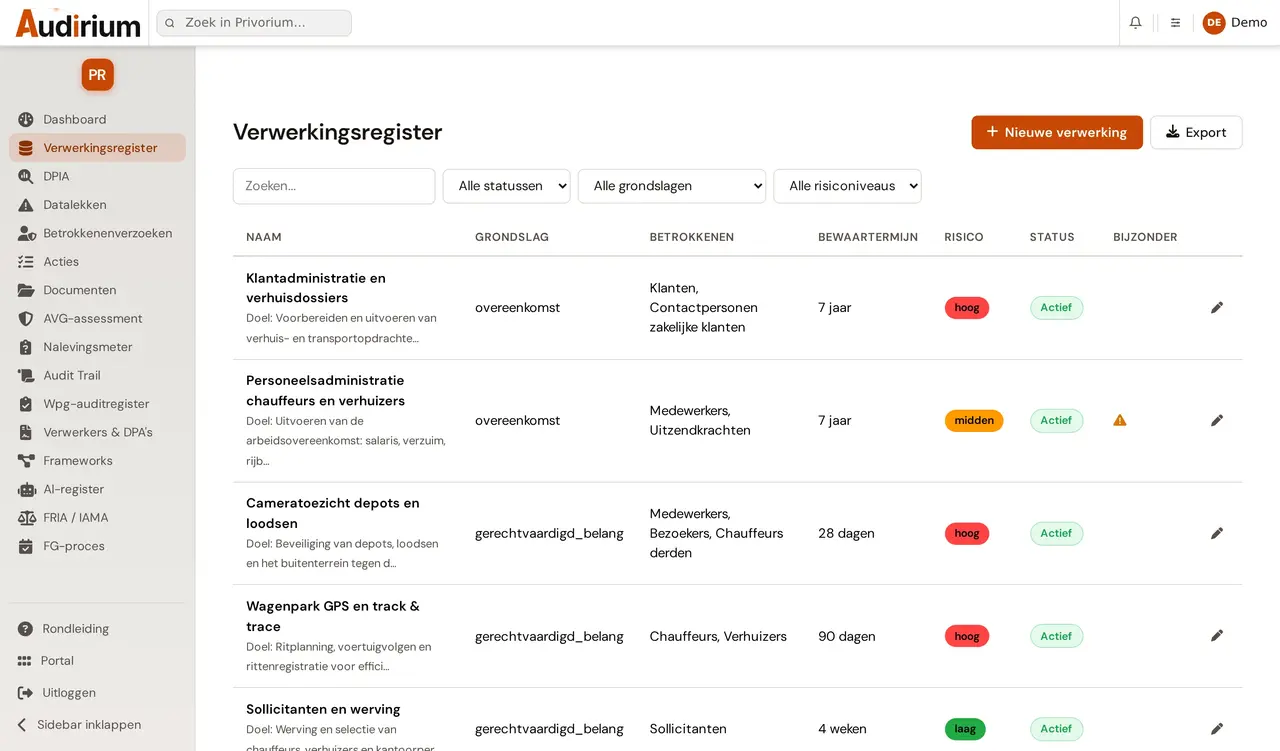
The register
Complete on the closing date of the inventory round. After that the organisation changes and the register does not.
The DPIA
After three versions in email, nobody can tell who described, who assessed and who advised.
The data breach
A 72-hour clock that starts the moment the breach is known, and a team still working out who does what.
The deadlines in between
An access request, a processor agreement, a retention period, a policy document: each has a clock, and rarely in the same place.
The register that ages from the day it is finished
A processing register usually comes out of an inventory round: interviews, a spreadsheet, a closing date. On that date it is complete.
Then a department adopts a new tool, a supplier changes sub-processor, a purpose shifts. Nobody reports it to the DPO, because the register is not where that department does its work. The version that went to the regulator a year earlier can only be found in old email.
Privorium records purpose, legal basis, categories of data subjects and recipients per processing activity, and keeps a version of every change. The difference between then and now can be read back.
The built-in assistant classifies a new processing activity by risk level and says whether a DPIA is likely to be needed. That is a proposal, not a judgement, and it sits in the file as a proposal.
More important is the relationship view: per processing activity you see everything attached to it, the DPIA, the processor agreement and the open actions. A processing activity that requires a DPIA but has no adopted DPIA is therefore a visible gap in the cockpit, not a forgotten row in a spreadsheet.
The DPIA that circulates as a Word document
A DPIA starts with facts the DPO does not have: what exactly is processed, why, in which system, for how long. Those facts sit with the process owner.
The usual route is a twenty-page template sent out by email that comes back half filled in, after which the privacy office completes the rest based on a conversation. The risk analysis and the DPO's advice end up in the same document.
In Privorium, the privacy office sends out a DPIA intake with a personal link. Through that link, the process owner fills in the facts in the browser, without an account, and can save along the way.
When sending it out, you choose how deep that intake goes: just the facts, the lawfulness as well, or on top of that a first draft of the risks, which the privacy office then validates.
What comes in lands as a draft DPIA in the DPIA module. There the assessment runs in six steps: context, necessity and proportionality, risk map, measures, DPO advice and conclusion.
That the DPO's advice is a step of its own is no detail. The DPO advises and supervises but does not do the work, and the file shows that this is how it went.
Once the DPIA has been adopted after those six steps, the app turns it into a management summary as a Word document, with the final judgement, the residual risks on the matrix, the measures and the adoption block.
The data breach on Friday afternoon
Articles 33 and 34 are clear about the deadlines. The question on Friday afternoon is how many hours are left and who has to act now.
From the date of discovery, Privorium calculates three obligations: notify the supervisory authority within 72 hours of becoming aware, inform data subjects without undue delay in case of high risk, and record the breach in the breach register, which always applies, even if you do not notify.
Each obligation shows its legal basis, deadline and status: open, urgent, expired or notified. In the list a counter counts down, and that counter and the table in the detail screen come from the same calculation.
That calculation sits in one shared module, the same one Audirium's NIS2 app and TPRM app use. Two apps calculating a notification deadline slightly differently is not a cosmetic flaw.
That calculation comes with one limitation: the form records a date, not a time. The clock therefore starts at midnight on the day of discovery, and the remaining time you see is the safe lower bound.
On request, the assistant drafts an assessment, notifiable or not and inform data subjects or not, plus a draft notification text. The DPO or privacy officer decides and records the actual notification date; with that, the first obligation flips to notified.
For organisations that also fall under the Dutch Cybersecurity Act (Cyberbeveiligingswet), the Frameworks module qualifies an incident for the double notification duty: 72 hours to the Dutch Data Protection Authority (Autoriteit Persoonsgegevens) and 24 hours to the CSIRT.
Requests, processors and the deadlines in between
Besides the data breach, more deadlines are running. An access request has one month, extendable. A processor agreement has an end date, a sub-processor chain the supplier must report under Article 28, and a transfer safeguard that differs per country. A policy document has a review date.
Each of those deadlines is tracked somewhere, rarely in the same place. The DPO who wants to know what expires this month adds them up.
The GDPR allows one month to respond, extendable by two further months for complex or numerous requests (Article 12(3)). Privorium calculates with 30 days, or 90 days when extended, and shows what has expired.
The register of processor agreements records per agreement the term, the sub-processors as a chain, the country and the safeguard: adequacy decision, standard contractual clauses, binding corporate rules or none. The date on which a change was reported is recorded too.
A processor that is marked active but not yet signed shows in the list as not signed, not as green.
The privacy calendar in the DPO process is a cross-section of all those tables: requests, breaches, agreements, documents and actions, with the shortest running deadline highlighted separately. There is nothing to maintain twice, because the calendar stores nothing itself.
The principle: the processing activity as the hub
Record once, reuse everywhere.
In the GDPR, the processing register is the overview that carries the rest: the DPIA obligation follows from the processing activity, the processor agreement belongs to a processing activity, a data breach affects a processing activity. Privorium is built that way.
A DPIA is attached to a processing activity. A fundamental rights assessment is attached to a DPIA, because Article 27(4) of the AI Act allows the two to be combined. The DPIA work then does not have to be redone.
An action carries the source it came from: a DPIA measure, a data breach, an audit or an accepted residual risk from the IAMA. If you revise that residual risk, the same action is updated and no second one is added.
The same goes for the frameworks. Privorium builds no framework of its own: the GDPR, NIS2 and other frameworks come from Audirium's central framework library and are read only. Per organisation, Privorium stores nothing but the compliance status per requirement. So if a framework changes, it changes in one place.
And it goes for the roles. On the start screen you choose between three entry points: the DPO, who advises and supervises; the privacy officer or process owner, who does the operational work; and management, which decides on the outcomes as controller.
That division is not cosmetic. The DPO's advice is a step of its own in the DPIA, an action can carry DPO approval and the owner is notified of it, and the annual report counts what happened rather than what was written down.
The model underneath
Five layers. Each layer references the one before it, and the top layer records nothing itself.
| Layer | What goes in | What comes out |
|---|---|---|
| Processing activitiesthe hub | The Article 30 register: purpose, legal basis, data subjects, recipients, security, with a version per change and a risk classification as a proposal. | Everything in the layers above references a processing activity. |
| Assessmentsjudgement with a name and a date | DPIAs in six steps, with intake through a personal link. Fundamental rights assessment (IAMA v2, the Article 27 core or a compact FRIA) linked to the DPIA. GDPR self-assessment. | A judgement with a name and a date on it, and measures that flow through to the action list. |
| Events and agreementsclocks that count by themselves | Data breaches with the notification clock, data subject requests with deadlines, processor agreements with sub-processor chain and safeguards, retention periods, policy documents with review dates. | Deadlines that announce themselves, and the breach register the GDPR always requires. |
| Actionsone list | One list across all sources, with owner, deadline and the register the action came from. The owner is notified on assignment and on DPO approval. | Demonstrable follow-up; actions past their deadline weigh in the traffic light of the cockpit. |
| Steeringrecords nothing itself | Cockpit with a figure over eight sub-measures, privacy calendar, Compliance Meter, DPO annual report, maturity scan and the Audit Trail of all changes. | Reporting for the board or the client, counted from the layers below and retyped nowhere. |
The gain is in the references. Because a DPIA is attached to a processing activity and an action to its source, the question "which processing activities that require a DPIA still have no adopted DPIA" is a count. And that count is in the cockpit.
What the DPO gets out of it
What you put in a board report, and what you have to say alongside it.
A figure that measures coverage instead of penalties
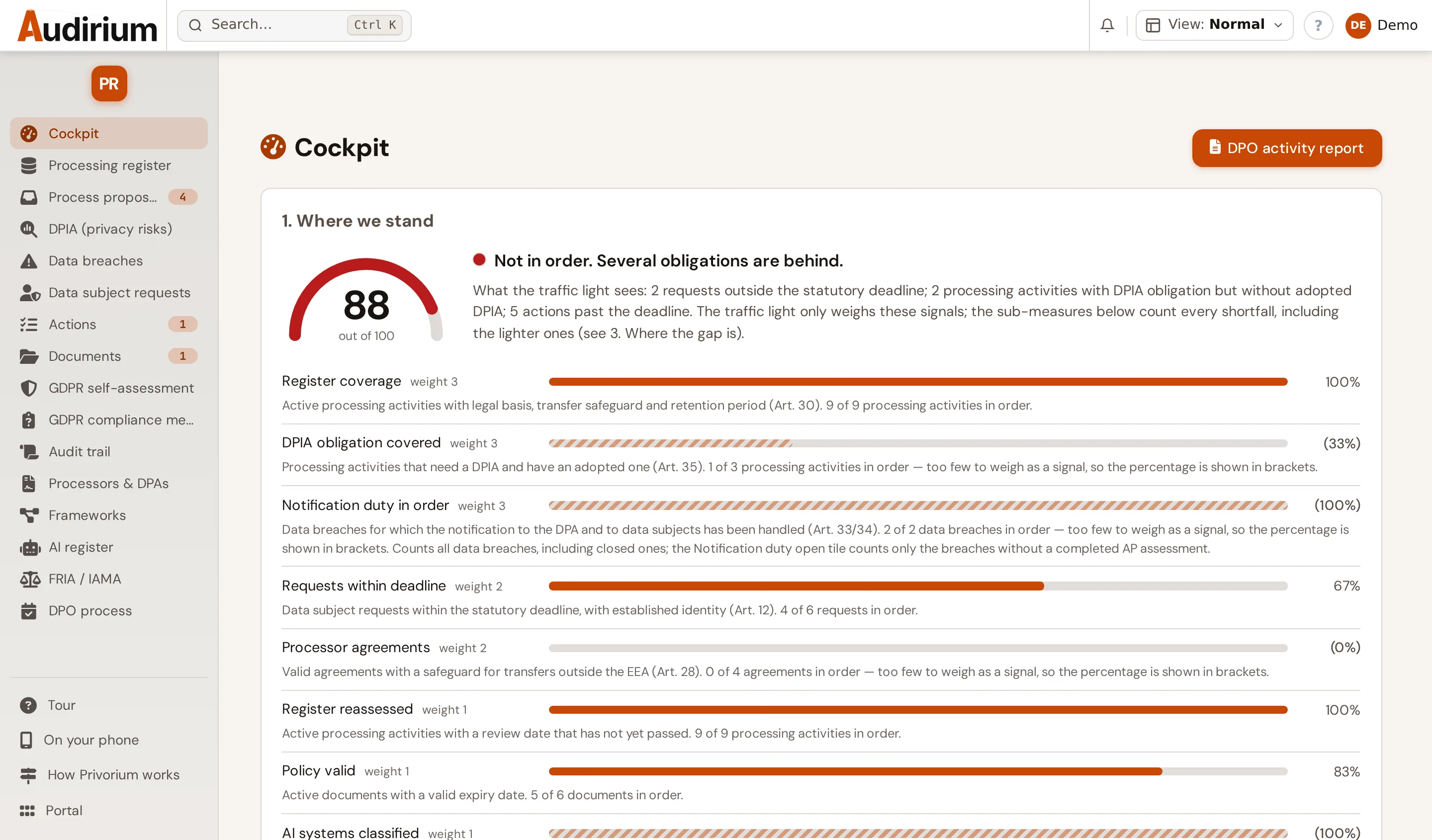
The cockpit opens with a figure from 0 to 100, a traffic light and eight sub-measures. Below them are three bands: what is moving, where the gap is and who is up. The figure is a weighted average of what the registers themselves contain.
The eight sub-measures are register coverage (Article 30), DPIA obligation covered (Article 35), notification duty in order (Articles 33 and 34), requests within deadline (Article 12), processor agreements (Article 28), register reviewed, policy valid and AI systems classified. The first three carry a weight of three, requests and processor agreements two, the rest one.
A figure that starts at one hundred and deducts points gives an organisation that has recorded nothing yet a perfect score. Here it works the other way round: an empty register never scores green. A sub-measure about work your organisation does not do, for example no breach recorded yet, does not count and shows as not applicable, not as zero.
The traffic light sees more than the figure. An average of 76 can be red because a processor agreement has lapsed or a request is past its deadline. The traffic light counts per group and lets the heaviest gap decide, so two symptoms of the same problem are not penalised twice.
Every gap and every tile clicks through to the rows it counts. Below five rows the cockpit makes no statement about the organisation, because a percentage over three rows says nothing. The cockpit is just as cautious about what is missing. A notifiable breach without a notification date is called not recorded, not notified late, because it may have been notified on time and simply not written down. That is a gap in evidence, not a violation.
The gap between knowing and doing
An awareness training proves that employees were informed, not that they act differently. The Compliance Meter measures that difference.
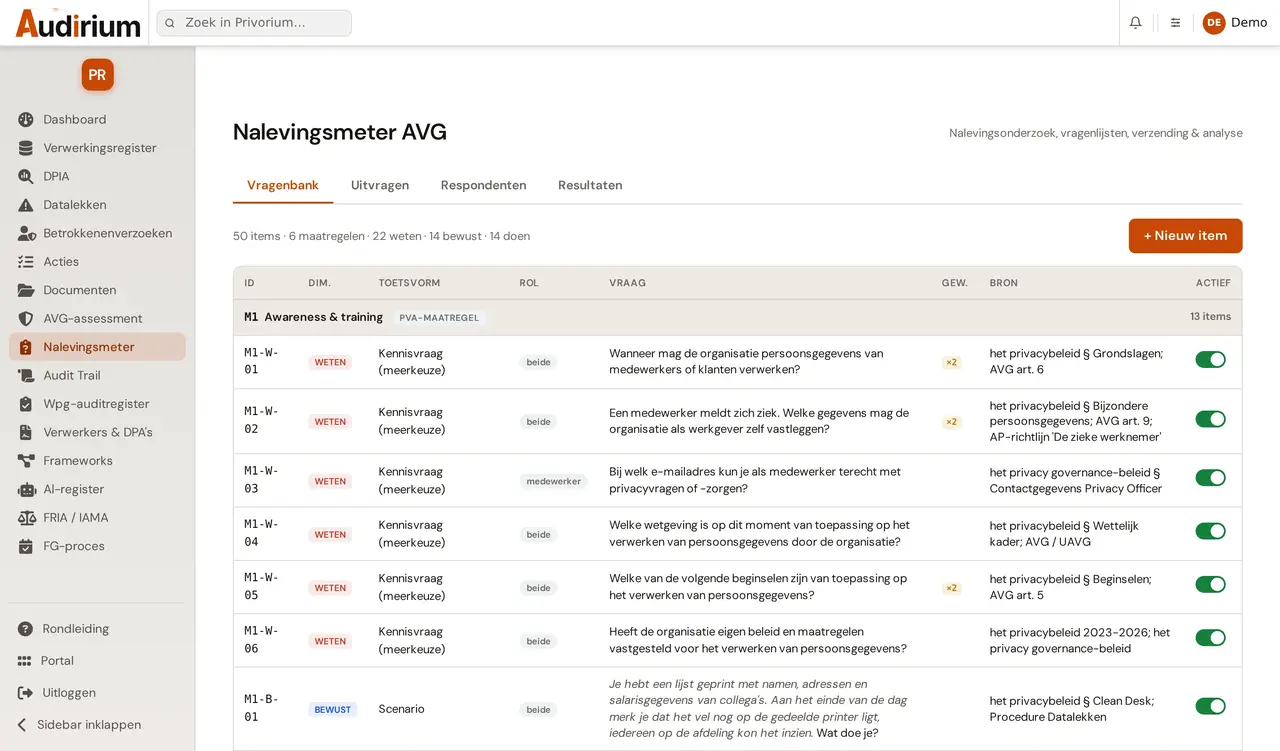
Employees and managers receive a personal link, without an account, and answer knowledge questions, scenarios and frequency questions about six measures.
Each measure is scored on three dimensions: knowing, aware and doing. A measure only counts as met when all tested dimensions score above the threshold; a dimension that was not tested counts as undetermined, not as negative.
Submissions are pseudonymous. A submission carries only department and role, with no reference to the invitation or the person; name and email address serve solely for sending and reminders and are stored encrypted.
The correct answer to a knowledge question never leaves the server towards the respondent. A cell with too few respondents gets a low-reliability flag, and the report then opens with a warning about representativeness.
The outcome is the knowing-doing gap per measure and per role. An employee who knows the rule and still acts differently calls for a different intervention than training.
The results report goes along as a PDF or as four CSV tables, as an appendix to an audit. In addition there is an interview guide with follow-up points per department and role, and a management summary with a traffic light per measure. No export contains a list per person, not even for a non-anonymous survey.
A fundamental rights assessment that reuses the DPIA
The IAMA was revised to version 2 in February 2026 and explicitly aligned with Article 27 of the AI Act.
Privorium runs one instrument with three profiles on the same storage: the full IAMA v2 with 68 questions across five parts, the 16 questions the IAMA itself marks as Article 27 requirements, or a compact FRIA in five steps with a fundamental rights impact matrix.
You can switch at any time; the answers stay. The question whether the algorithm is self-learning is asked up front, so you never get both branches of section 2.2 on screen.
Above the screen are three gates the instrument itself sets: have all Article 27 questions been addressed, were the prescribed disciplines at the table (at least a project lead, a data scientist and a lawyer, recorded per session), and is there a decision on the residual risk with a name and a date.
If the residual risk is accepted, that decision creates an action with the reassessment date as its deadline. The decision is also in the export as a Word document, together with all questions, answers and sessions.
The question texts are literally those of the Dutch Ministry of the Interior and Kingdom Relations (BZK), with the source attribution and the disclaimer the ministry has asked for, at the bottom of every screen and in every export.
An annual report that counts instead of describes
The DPO annual report comes out of the registers as a Word document: numbers of processing activities, DPIAs, data breaches, requests and actions over the year, counted from what was recorded.
The maturity scan records a level per domain and keeps the previous scan, so the growth path is visible.
The AI register inventories AI systems with their risk class under the AI Act. A system that acts autonomously is marked as an agent, with mandate, tools, limits, kill switch and log as separate fields.
Every change in the app, in whichever module, is in the Audit Trail and can be exported as CSV.
The six measures the Compliance Meter tests
Where knowledge and behaviour can diverge.
Awareness and training
Does an employee know when the organisation may process personal data, and what do they do with a list left on the shared printer.
Follow-up of DPIA results
Do the measures from an adopted DPIA actually land in the process, or does it stop at the document.
Compliance with processor agreements
Is a new supplier registered before the data starts flowing, or afterwards.
Privacy by design and by default
Does the privacy question come up at the start of a project or at delivery.
The privacy supervision process
Do colleagues know how to find the DPO, and does that happen before a decision has already been taken.
Data breaches and incidents
Does someone report a misaddressed email, and how quickly. This is usually where the gap between knowing and doing is deepest.
How it works in practice
The same way of working as on the tools page, here split into six steps.
Fill the register
Enter the processing activities, or let the assistant propose a first classification. From here on, everything references these rows.
Send out the DPIA intake
For each processing activity that requires a DPIA, choose how deep the process owner fills in and send the personal link. The facts come from whoever knows them; the privacy office does the analysis.
Assess and advise
Risk map, measures, DPO advice and conclusion, each as its own step. Where an algorithm is involved, the fundamental rights assessment is attached to the same DPIA.
Record agreements and deadlines
Processor agreements with chain and safeguard, retention periods, policy documents with review dates. The calendar reads along.
Handle what comes up
A data breach gets its notification clock, a request its deadline, a measure its action with an owner. Everything open is in one list.
Measure and report
The Compliance Meter for practice on the work floor, the cockpit for the current state, the annual report for the board.
Practical
The questions that usually come second.
- Hosted in the European Union (Germany). Every organisation has its own, separate database. Within it, sensitive fields are encrypted with a key per organisation: the description, cause and reasoning of a data breach, the name and content of a data subject request, the security and note fields of a processing activity. The name and purpose of a processing activity are deliberately left unencrypted, because you need to be able to search on them and they contain no personal data.
- AI as a proposal, with a choice. The assistant classifies processing activities, drafts a breach assessment and reviews documents; you decide. Per organisation, the administrator chooses the mode: full context to the default model, which runs in the United States under a contract without training on your data; anonymised, where personal data is replaced locally before the text leaves the server; or exclusively a model in the EU. Document OCR runs through an EU model by default.
- No accounts for those who only contribute. Process owners and respondents work with a personal link that expires and stops working after submission. The link belongs to one organisation, fixed at creation by the logged-in author.
- Multiple organisations, one entry point. For the fractional DPO who serves three or ten organisations: a separate file per organisation, and the same way of working in each of them.
- Frameworks from one library. GDPR, NIS2 and other frameworks are read from Audirium's central framework library; Privorium stores only your compliance status. Sector checklists for healthcare and education are in the Frameworks module.
- Where it stands now. Privorium runs at organisations with real data. A few edges are not smooth yet, and I would rather say so up front. A measure in step 4 of the DPIA cannot be edited yet, only added or removed. The integration that manages data breaches in Audirium's incident module sits behind a per-organisation switch that is off by default.
What a DPO or privacy officer misses is still cheap to add now.